Laboratory 2: Functions and Arrays
Functions, arrays, C character strings, arguments to main, header files
Goals
After this lab you will be able to
- Create and use functions
- Create and use statically allocated arrays
- Create and use text strings (null-terminated character arrays)
- Build programs from multiple source files
- Create and use header files containing function declarations
- Use arguments passed to main()
Tasks
- Functions and header files
- Arrays
- Program arguments
- Redirecting stdin and stdout
- CENSORED
- Letter frequency
Setup
- Find or checkout a working copy of your repo. See the instructions in Lab 1 if you can't remember how.
- cd to the root of your working copy
- Fetch the new material for Lab 2, stored in a compressed tar archive:
$ wget http://www.cs.sfu.ca/~vaughan/2.tgz
- Expand the archive into the current directory:
$ tar xzf 2.tgz
- Add the new directory "2" to your repo:
$ svn add 2
- Change directory into 2, which will be our lab 2 working directory:
$ cd 2
Function definitions, declarations and header files
Guide
C is a structured, procedural programming language, that is, it supports the definition of isolated, self-contained blocks of code that can be re-used as components of larger programs. In C and Python these are called functions, but other languages call them procedures, subroutines, or methods.
Given a well-designed function, you can often use it for what it does, and ignore the internal details of how it works. This idea of functional encapsulation makes it feasible for humans to write complex programs by breaking them down into small, more manageable pieces. You have already used several functions provided by the standard library, such as printf and floor, without seeing how they were implemented. One such function is max(), which could be implemented and used as follows:
- // returns the larger of the two arguments
- int max( int x, int y)
- {
- if( x > y )
- {
- return x;
- }
- return y;
- }
- int main( void )
- {
- int a = 11;
- int b = 12;
- printf( "The max of our numbers is %d\n", max( a, b );
- return 0;
- }
Reading the first 8 lines of code top-to-bottom, left-to-right, we see:
- Line 1: A comment describing what the following function does. This is optional but good style.
- Lines 2-8 are the function definition, as follows:
- The result, or return value of running this function is of type int
- The name of the function is max
- The function takes two integer arguments called x and y
- The body of the function, i.e. the code that will execute when the function is called, starts at {
- In the body of the function, the keyword return evaluates the expression to it's right which becomes the function's return value, then exits the function.
- The body of the function ends at the closing }.
Having been defined in lines 2 to 8, function max() is called on line 15. The values of integers a and b are assigned to x and y inside max(), the function does its work, and the return value is passed as the second argument to printf().
The syntax for C functions is
type functionName( type arg_name1 [, type arg_name2, ...] )
{
    // code-block function body enclosed by curly braces
}
Note that main() itself is a normal function. The system calls it to start the program.
The name "function" is a little unfortunate, since these are not the same as mathematical functions. Mathematical functions express relationships, while program functions perform sequences of operations on data. To see the difference, consider the function max() above and the following function output():
- void output( double val )
- {
- printf( "the value is %.2f\n", val );
- }
where void is a special type that means "nothing". Since there is nothing to return, we can omit the return statement and the function will finish at the end of the code block.
Clearly output() does not describe a relationship between entities; instead it causes useful things to happen. Strictly speaking this is true of the C function max() as well: it implements the mathematical function max() by returning the largest of its arguments.
We are stuck with the C convention of calling our procedures "functions". In practice this is not usually a problem. We will return to the differences between "true" functions and C functions later in a discussion of software engineering approaches.
Multiple arguments
As the syntax above indicates, function definitions can specify an arbitrary number of arguments, for example:
- double volume( double width, double height, double depth )
- {
- return width*height*depth;
- }
However, C functions can have only a single return value. Other languages such as Lisp and Go support multiple return values, so this asymmetry between the number of arguments and results was a design decision in C. It keeps the syntax simple.
Functions in functions
Since main() is a function, it should be apparent that functions can call other functions. In general a function may call any other function. One interesting situation is when a function calls itself, a process called recursion. Many algorithms are elegantly expressed as recursive functions. You may have seen this idea before: proof by induction relies on it.
Function Declarations
Above we looked at three function definitions: max(), output() and volume(). A function can be called in a C source code file below its definition. Why only below? The compiler reads the source file from top to bottom. If it sees a call of function foo(), it doesn't know anything about that function. Did you specify the right number and type of arguments? There's no way to know. The compiler will complain.When you want to use a function that is not defined in your source file, for example a standard library function, we need some way to tell the compiler the name of the function, its arguments and return type. The implementation of the function will be provided from a library or some other source file.
A function declaration is the same as its definition, but with the function body replaced by a semicolon. Thus for volume() above, a matching declaration is:
double volume( double width, double height, double depth );
Header files
Your code almost always begins by including some header files:#include <stdio.h> #include <math.h> (etc)
Recall that #include copies the contents of the indicated file into the current source file. Specifying the name of the header file <like this> forces the compiler to look for the file in the directories where your compiler was installed. To specify file you wrote yourself put the filename in quotes "like this". For example:
#include <stdio.h> // a system-supplied header
#include "myheader.h" // a header I wrote myself
The quotes version understands paths relative to the current directory, and absolute paths, e.g.:
#include "myheader.h" // in the current directory
#include "include/myheader.h" // in a subdirectory
#include "../myheader.h" // in the parent directory
#include "/opt/local/include/myheader.h" // an absolute path
C header files usually contain mostly function declarations. In the case of the standard library the implementations of these functions were pre-compiled for you into code libraries and shipped with your compiler to save you time. The required libraries are linked into your program at the last step of compilation. The library containing printf() is used so often it is linked by default. The math library containing floor(), etc. is used less often, so we have to request it in in the compile command. It is still used a lot, so the designer gave it the nice short name "m".
$ gcc mycode.c -lm
Header files also provide important constant values, such as the special value EOF (usually -1) returned by scanf() when reaching the end of a file. Occasionally they also declare global variables.
Now you know how to define and declare functions, and what header files do.
Using multiple source files
Function declarations and header files are also used when breaking your own code up into multiple source files. For example, in your working directory you have the source files funcs.c containing useful function definitions and main.c containing your main program:
Contents of funcs.c:
- // returns the larger of the two arguments
- int max( int x, int y)
- {
- if( x > y )
- {
- return x;
- }
- return y;
- }
- // returns the smaller of the two arguments
- int min( int x, int y)
- {
- if( x < y )
- {
- return x;
- }
- return y;
- }
Contents of main.c:
- #include <stdio.h>
- int main( void )
- {
- int a = 11;
- int b = 12;
- printf( "The max of our numbers is %d\n", max( a, b ));
- printf( "The min of our numbers is %d\n", min( a, b ));
- return 0;
- }
Given multiple source files on its command line, the compiler will attempt to compile them all into one program. Try this now:
$ gcc -Wall funcs.c main.c
The -Wall compiler option enables "all warnings". The compiler will be very strict.
With these files as they are you will get warnings and possibly errors complaining that in main.c min() and max() and not properly declared. The exact message you get depends on your compiler vendor and version, but in CSIL we get:
main.c:7:45: warning: implicit declaration of function 'max' is invalid in C99
 [-Wimplicit-function-declaration]
  printf( "The max of our numbers is %d\n", max( a, b ));
                                            ^
main.c:8:45: warning: implicit declaration of function 'min' is invalid in C99
 [-Wimplicit-function-declaration]
  printf( "The min of our numbers is %d\n", min( a, b ));
                                            ^
2 warnings generated.
Requirements
First, check that you completed the Setup section above, so your current working directory is <repo working copy>/2 . The shell command pwd prints the current working directory.
- Create a new file called funcs.h that contains function declarations for all the functions in funcs.c. Edit the file main.c to #include the new header file.
- The finished code must compile with this command with no errors or warnings.
$ gcc main.c funcs.c
- The finished code must output
The max of our numbers is 12
The min of our numbers is 11
Testing and Submitting
The compiler will produce informative complaints if your declarations are not correct. Read the compiler output very carefully, starting with the top lines.
Submit by adding your header file and committing your changes:
$ svn add funcs.h
$ svn commit -m "task1 submit"
Arrays
Guide
In C any type can be used to create both simple variables and arrays:
int a;       // a single integer
int b[100];  // an array of 100 integers

char c;      // a single character
char d[100]; // an array of 100 characters
Array elements are accessed by index, counting from 0:
int b[100]; // an array of 100 integers

b[0] = 99; // set the first element of b
int e = b[42]; // get the 43rd element of b
int f = b[100]; // OOPS! this is the 101st element of a 100-element array
C arrays have some important limitations compared to arrays/vectors in other languages:
- All elements of the array are the same type;
- Array sizes are fixed at creation time;
- The value of array elements is not initialized;
- Access to elements is not bounds checked (i.e. lookups are not checked to make sure (0 <= index < array size)).
These limitations mean that C arrays must be used carefully but are very fast indeed. There is a trivial amount of overhead in accessing data from an array compared to a normal variable. There is also very little cost to creating arrays. For these reasons C programmers use native arrays a lot despite the limitations.
Arrays are allocated as contiguous chunk of memory, of size (array-length * sizeof(type)) bytes. The name of the array is a pointer to the first byte of the first element in the array. The memory is automatically freed when the array variable goes out of scope. And that is all there is to implementing arrays in C. It is an incredibly simple and efficient design.
Because arrays are thinly-disguised pointers, these things are true:
int b[100];
&b[0] == b;
*(b+5) == b[5];
*(5+b) == b[5];
(5+b) = &b[5];
Most people find the square-bracket array-indexing syntax easier to read than pointer arithmetic, but they are exactly equivalent to the compiler.
Passing arrays to functions
Since array variables are pointers, you can pass them into functions as such. Consider this code:
- #include <stdlib.h>
- #include <stdio.h>
- // return the largest int in the array
- // (pointer syntax)
- int array_max_ptr( int* arr, int len )
- {
- int max = 0;
- for( int i=0; i<len; i++ )
- {
- if( arr[i] > max )
- {
- max = arr[i];
- }
- }
- return max;
- }
- // return the largest int in the array
- // (preferred array-specific syntax)
- int array_max_brackets( int arr[], int len )
- {
- int max = 0;
- for( int i=0; i<len; i++ )
- {
- if( arr[i] > max )
- {
- max = arr[i];
- }
- }
- return max;
- }
- const int sz = 10;
- int main( void )
- {
- int a[sz];
- for( int i=0; i<sz; i++ )
- {
- a[i] = random();
- printf( "a[%d] == %d\n", i, a[i] );
- }
- printf( "Largest was\n %d\n %d\n",
- array_max_ptr( a, sz ),
- array_max_brackets( a, sz ) );
- return 0;
- }
The two versions of the array_max function have different syntax for passing the array, but are otherwise identical. You should almost always use the array-bracket syntax version ( int arr[] ) since it tells the human reader that an array is expected. The compiler doesn't care.
Note that we had to pass the length of the array into both versions. Arrays do not know how long they are.
Read this example carefully. Discuss it with your partner until you understand every bit before you move on.
Requirements
- Create a new file called scrambled.c, containing a single function that matches this declaration:
int scrambled( int a[], int b[], int len );
- Arrays a and b are guaranteed to both be of length len.
- len can have any value >= 0.
- The function scrambled() should return 1 iff arrays a and b contain the same values in any order, or 0 otherwise.
Examples of arrays for which scrambled should return 1:
- a = {10,15,20}, b = {10,15,20}
- a = {100}, b = {100}
- a = {1,2,3,4,5}, b = {5,3,4,2,1}
- a = {}, b = {} (i.e. len = 0)
- a = {2,1,3,4,5}, b = {1,2,4,3,5}
Examples of arrays for which scrambled should return 0:
- a = {1,1}, b = {1,2}
- a = {10,15,20}, b = {10,15,21}
- a = {1,2,3,4,5}, b = {5,3,4,2,2}
Example of a program that uses your function:
- #include <stdio.h>
- // declaration of function implemented in scrambled.c
- int scrambled( int a[], int b[], int len );
- int main( void )
- {
- int a[3] = {10, 15, 20};
- int b[3] = {10, 20, 15};
- if( scrambled( a, b, 3 ) == 1 )
- {
- printf( "b is a scrambled version of a\n" );
- } else {
- printf( "b has different contents to a\n" );
- }
- return 0;
- }
Note the curly-brace syntax for initializing arrays. This only works when you first declare the array.
There is a simple O(n) algorithm to solve the problem.
To reiterate: you must not submit a complete program, though you will need to write one to test your function yourself. You must submit a single file containing a single function.
Testing and submission
You should write your own test program with a main() function, using the example above as a guide.
When your function works, add and commit only the file scrambled.c to the repo:
$ svn add scrambled.c
$ svn commit -m "scrambled is working"
Program arguments
So far you have written programs that read their input from stdin. Another way to get data into a program is with program arguments. For example when using the shell's file copy program cp:
$ cp original copy
cp is not using stdin, so how does it learn about the filenames to read from and copy to? The answer is as arguments to main(). Your program must have a single main function and it can be declared like this if it needs no arguments from the outside world:
int main( void )
{
...
}
or, if it needs arguments, like this:
int main( int argc, char* argv[] )
{
...
}
These two arguments work for any possible arguments to your program. This is quite a clever design, and it works by using arrays and pointers.
The arguments are interpreted as follows.
int argc is the number of arguments passed into main. For the cp original.txt copy.txt example, this is 2.
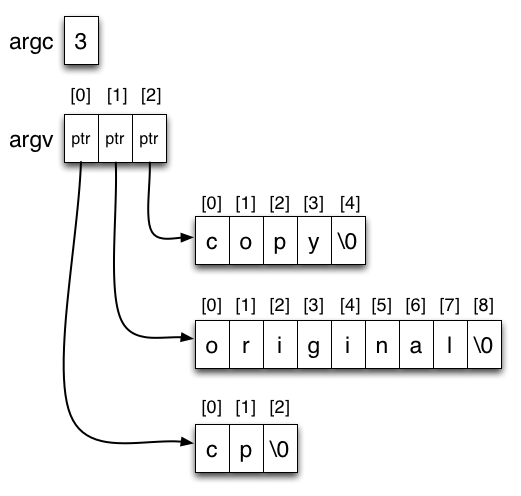
char* argv[] is an array of char pointers. The argv array is argc+1 pointers long. The zeroth entry in argv is always the program's own name (what use is this?). The subsequent entries are the program arguments in order. For our cp example the contents of the array are:
argv[0] : "cp"
argv[1] : "source"
argv[2] : "copy"
Recall that a C string is a character array containing a special NULL character (the character '\0' or value 0) to mark the end of its text: the null terminator. Each pointer in the argv array points to the first character in a character array. The result for our example can be drawn as follows, if we use arrows to represent pointers:
Thus we can sketch an implementation of cp like this:
- int main( int argc, char* argv[] )
- {
- int inputfile = open( argv[1], O_RDONLY ); // open a file for read only
- int outputfile = open( argv[2], O_RW | O_CREAT ); // create a new file for writing
- while( ... ) // we haven't read everything from inputfile
- {
- ... // read bytes from inputfile and write them to outputfile
- }
- return 0; // success!
- }
I want numbers, not text strings
Since main's arguments are stored as character strings, another step is needed to convert strings that represent numbers into number types before you use them. The atoi() and atof() functions convert strings to integers and floating point values respectively:
- #include <assert.h>
- int main( int argc, char* argv[] )
- {
- if( argc != 3 ) // yes 3! argv[0] is the program name
- {
- printf( "I wanted 2 arguments\n" );
- }
- int i = atoi( argv[1] );
- float f = atof( argv[2] );
- ...
- }
The program can be run like so and work as expected:
$ ./a.out 5 3.14
- Write a program called "contains" that takes two text strings as arguments and prints "true" if the second string is entirely contained within the first, or "false" otherwise.
- The strings contain only ASCII characters and may be any length > 0 characters.
This is an important problem in computer science, with wide applications from searching the internet, to understanding text, to finding DNA matches. It's easy to state and easy to code. It gets interesting when the strings are long and you want to do it very efficiently. For now you can be happy with a simple solution that shows you can manage your argv array and char strings.
Example runs:
$ ./contains "I have a really bad feeling about this" "bad feeling"
true
$ ./contains "To be or not to be" "That is the question"
false
$ ./contains "I am the walrus" "I am the walrus"
true
$ ./contains "the walrus" "I am the walrus"
false
$ ./contains "kmjnhbvc45&^$bn" "."
false
Notice that the strings do not have quote characters around them when delivered to your program via argv. The quotes prevent the shell from breaking the strings up into individual words.
You may find the standard library function strlen() useful. Read it's manpage.
Testing and submission
Save your implementation as the single C source file t3.c. When you think it works, add and commit t3.c.
Redirecting stdin and stdout
Guide
You will find it tedious to type lots of text into your program's stdin. The shell has a powerful tool to help with this: stream redirection. This allows you to route the stdin and stdout for a program away from the console and into a file. For example, if we have a program called hello that prints "Hello world!\n" on stdout, we can do this:
$ ./hello > myfile.txtThis creates a new file myfile.txt. Anything written to stdout in the hello program is written to the file. To confirm this, inspect the contents of the file with cat:
$ cat myfile.txt
Hello world!
Similarly, we can take the contents of a file, and stream it into the standard input of our program. So if we have a program sort that reads lines from stdin, sorts them into lexical order then writes them on stdout, we can do this:
Contents of beatles.txt:
john
paul
george
ringo
$ sort < beatles.txt
george
john
paul
ringo
Input and output redirection can be used together:
$ sort < beatles.txt > sorted.txt
$ cat sorted.txt
george
john
paul
ringo
This is a very powerful mechanism that is great for testing with lots of different inputs. It's much more convenient to redirect a file into stdin than to type many lines followed by ctrl-d over and over. Make sure you understand file redirection!
Here is a terse but good introduction to BASH shell programming, including a section on redirection.
Here is an exercise that will make you glad you knew about shell redirection:
Requirements
- Write a C program that counts the number of characters, words and lines read from standard input until EOF is reached.
- Assume the input is ASCII text of any length.
- Every byte read from stdin counts as a character except EOF.
- Words are defined as contiguous sequences of letters (a through z, A through Z) and the apostrophe ( ', value 39 decimal) separated by any character outside these ranges.
- Lines are defined as contiguous sequences of characters separated by newline characters ('\n').
- Characters beyond the final newline character will not be included in the line count.
- On reaching EOF, use this output command:
printf( "%lu %lu %lu\n", charcount, wordcount, linecount );
Where charcount, wordcount and linecount are all of type unsigned long int. You may need these large types to handle long documents.
Guide
You may find the standard library function getchar() useful. Read its manpage.
There's a handy standard program called wc that does a similar job, but it does not match the requirements exactly (it is a little more clever about word boundaries and will sometimes count fewer words than our simple program). Your program should agree with wc's character and line counts, as the logic for those is the same.
Testing and submission
Save your implementation as the single C source file t4.c. Add and commit t4.c.
CENSORED
Requirements
- Write a C program called censor that takes any number of one-word text string arguments, each less than 128 characters long.
- "Word" is defined as in the previous task.
- The program copies text from stdin to stdout, except that any of the words seen in the input are replaced with the word "CENSORED".
- The argument and the input stream are both ASCII.
- The input to stdin is of any length.
Example runs:
$ cat poem.txt
Said Hamlet to Ophelia,
I'll draw a sketch of thee,
What kind of pencil shall I use?
2B or not 2B?
$ ./censor Ophelia < poem.txt
Said Hamlet to CENSORED,
I'll draw a sketch of thee,
What kind of pencil shall I use?
2B or not 2B?
$ cat beatles.txt
paul
ringo
george
john
$ ./censor paul ringo john < beatles.txt
CENSORED
CENSORED
george
CENSORED
Testing and submission
Save your implementation as the single C source file t5.c. Add and commit t5.c.
Letter frequency
Requirements
- Write a program that calculates the frequency of letter occurrences in text.
- Read ASCII text from standard input.
- On reaching EOF, print to stdout the normalized frequency of occurrence for each letter a-z that appeared in the input, one per line, in alphabetical order using the format produced by
printf( "%c %.4f\n", letter, freq);
- Letters that occur zero times should not appear in the output.
- Characters other than lower and upper case letters should be ignored.
- Lower and upper case instances count as the same letter, e.g. 'a' and 'A' are both reported for the letter 'a' on the output.
- The frequencies reported should sum to approximately 1 (with a little slack for accumulation of printf rounding errors).
Example runs
Assume you have named your executable lfreq. The first two example runs show the user entering the text manually in the terminal. The third and fourth runs have text piped in from a file (and the middle of the alphabet is omitted from the output for brevity). A text file happy_prince.txt containing a classic story in English is provided for testing.$ ./lfreq aaab a 0.7500 b 0.2500
$ ./lfreq
q
q 1.0000
./lfreq < happy_prince.txt
a 0.0841
b 0.0140
c 0.0206
...
y 0.0240
z 0.0002
$ ./lfreq < "large novel in English.txt"
a 0.0817
b 0.0149
c 0.0278
...
y 0.0197
z 0.0001
Testing and submission
Save your implementation as the single C source file t6.c. Add and commit t6.c.