Laboratory 1: Getting started in C
Compiling, I/O, types, loops and using version control
Goals
After this lab you will be able to
- Follow the instructions for subsequent labs.
- Compile and run a C program from the command line in Linux.
- Submit code for evaluation using a version control system.
- Create and use variables of the native types and obtain their addresses.
- Perform basic input and output on the console.
- Link to the standard math library
- Write loops using the while and for syntax.
- Write conditionals using the if syntax.
- Obtain the evaluation results through the version control system.
Tasks
- Compiling and Hello World
- Data types and output
- Pointers and input
- Conditions
- Loops
- Simple statistics
- Pyramid projection 1
- Pyramid projection 2
Setup
In this class you will complete a weekly Lab. Each lab contains several tasks, small assignments that are submitted individually. The labs are automatically graded by our test server, which compiles and runs your code with various inputs and checks that the output is correct in each case.
We sometimes provide pre-written code or data using a source code version control system (VCS). You submit your code using the same system. This is how professionals develop code.
We use a popular Open Source VCS called Subversion. We will
call it by its command line program name "svn" for short. You will
learn about what version control can do for you later, but for now
just follow along.
Below we will walk through the process of downloading, or "checking out" a "working copy" of your personal source code repository. You will work inside this working copy directory, updating it, adding and modifying files, then submitting your changes to the server.
You can also update your working copy to fetch files that we add for you, including the results of the on-line tests.
The following section contains steps that you should perform. Whenever you see a section that looks like this, you should follow the instructions carefully. Don't move on until you have completed them. Seek help if necessary.
The following instructions will get you set up for this lab.
When commands are given, they are prefixed with a dollar sign '$' and a space. Do not type this - it is just used to represent the command prompt. For example, the command to list the contents of the current directory is "ls". We write:
$ ls
and you type only
ls at the command prompt and press return.
- Choose a directory to start from. Your home directory is fine.
- Check out a working copy of your repository. The checkout command is:
$ svn co http://punch.cs.sfu.ca/svn/CMPT127-1151-abramw/
- Change directory into your working copy
$ cd CMPT127-1151-abramw
- Create a new file, called "handle", containing a one-word unique nickname for yourself. This will be shown on the class progress leaderboard, so you may want to keep it confidential. Replace "secretnickname" with your own secret nickname.
$ echo secretnickname > handle
- Add the new directory to the version control system, so it will become a permanent part of your repository:
$ svn add handle
- Create a directory for this lab, called "1"
$ mkdir 1
- Add the new directory to the version control system, so it will become a permanent part of your repository:
$ svn add 1
- Commit your changes. This sends all the changes you made to the server, to create a new revision of your repository. Any future check outs will retrieve this new version.
$ svn commit -m "first try"
- Verify that this worked with the web interface to your repo. Click on the link http://punch.cs.sfu.ca/svn/CMPT127-1151-abramw/ to get there. When prompted you for your username/password, enter the same information that you would use to check your e-mail on SFU Connect.
You should see your "handle" file, the empty directory "1", and a revision number greater than zero.
- If you do not see these things, or you are baffled, review the steps above and check with a TA or instructor if necessary.
- Change directory into "1"
$ cd 1
- Check that your current working directory ends with CMPT127-1151-abramw/1. The instructions below assume this is true. You can use the shell command pwd (print-working-directory):
$ pwd
- You're ready to continue with the lab.
1. Compiling and Hello World!
In this task you will write a very simple C program, compile it, run
it, and read its output. You will then test the program to make sure it is correct. When satisfied, you will submit the finished code to our automated
system for testing.
Why compile code? Languages like Python are run inside
an interpreter, a program that reads source code and executes
it as it goes along. In contrast C code is compiled into
programs that run directly on the computer. The compiler does not run
the program, instead it transforms it into runnable machine
code. Compiled programs do not have the overhead of the interpreter
when they run, so in theory they could run faster and use less memory,
at the cost of the extra compilation step.
Why C? The speed and small memory footprint of well-written C is the key to its popularity, along with the availability of a C compiler for almost every computer you can find, including small embedded devices. C also has good support for the low level operations needed to interact with hardware, while being tolerably easy for humans to read and write. C is a lingua franca for application, systems and embedded programmers.
Much of the software you use every day is written in C or a descendant language (some data here and and here) and this has been true for many years. The most popular alternative is currently Java, which has a C++-like syntax but simplified memory management. Learning Java is easy if you know C++.
This is a simple but complete run-through of the work-flow you will use to complete most of the remaining tasks. Don't be concerned if you find this task or this lab trivial: tasks become more challenging soon enough.
Requirements
The requirements section is very important: it describes what your submission must do to pass the automated tests. It is colored bright pink so you can't miss it. The requirement for this task is:
- Write a C program that writes the string "Hello World!" onto standard output.
Guide
The guide section helps you through the process of
meeting the requirements. Some Tasks will have a long and detailed
guide section, others will have only a brief note.
The following C or C++ program prints a greeting to the standard output. Standard output, often abbreviated stdout is the name of a text stream that your command-line-based program uses to output text to the screen (or other places we will see later). You don't absolutely need to read it just now, but for reference a thorough definition of standard output is given at LINFO, a great source of Linux information.
- #include <stdio.h>
-
- int main( void )
- {
- printf( "Hello World\n" );
- return 0;
- }
Let's examine the program line by line. Our goal is to use the C library function printf() to compose a chunk of text and send it to stdout. Before we use this function, we need to import a declaration of its name and the arguments it accepts. This is provided with your compiler installation in the file "stdio.h". The compiler knows where to look for it. It's often in /usr/include. Line 1 copies the contents of this file directly into the program code. Below the #include line we can call any functions declared in the included file, including printf().
Line 3 defines a function called main() that returns an integer ("int") and takes no arguments ("void"). C programs always start running at the main() function. It's a bit more complicated in C++, but in both languages every program contains exactly one main(), which is called by the OS when the program starts. If you forget to define main(), the compiler will report an error. The body of the function follows from line 4 to line 7, contained in curly braces { ... }. Unlike Python, the C compiler ignores indentation and newlines completely: they are only used to lay out the code for humans to read. Spaces, tabs and newlines do nothing except separate the tokens - the linguistic atoms - of the language.
Line 5 uses printf() to write a text string to stdout. As in many other languages, C strings are a sequence of characters contained within double-quote characters "like this". We will come back to the details of C strings later. The string "Hello World\n" ends with a two-character escape sequence that represents the newline character. This is different than a print statement in Python that automatically ends the line for you: the C function printf() does not.
To have a newline in output, we have to represent it with this special escape sequence.
Line 5 is our first statement, a block of code that does some work. Statements end with a semicolon. This is different to Python which uses newlines to end statements.
Line 6 causes the main() function to return the integer value 0 (zero) as the result of the function. Back on line 3 we promised that the main function would return an integer, and the compiler would warn us if we forgot to do so. Since this is the main() function, the caller is the command shell which invoked (ran) the program, which receives the value zero as the program's result. C programs always return an integer, and programmers conventionally use this value to indicate that the program was successful by returning zero, or a non-zero error code if something went wrong. We return zero to indicate that we detected no problems.
Building the program
Follow these steps to build and test your program.
- Make sure you are in your lab working copy directory "1" by following the steps above.
- Open a text editor. gedit is installed for you in CSIL, easily available on all Linux systems, runs in a window and uses the well-known Windows keybindings. Of course, you can use any other text editor you like.
- Type in the code from the box above into a new file and save it as "t1.c". C files conventionally have a .c suffix.
- Compile the source code file to create a runnable program like so:
$ cc t1.c
- If the program compiled correctly, the compiler created a new file in the current directory called a.out containing your executable program. If you get error messages instead read them carefully, top to bottom and edit the code to fix the first reported error, then compile again. Once all looks well, run your program using its name like so:
$ ./a.out
(where "./" means "this directory"). You should see the expected output on your console: Hello World
- Specify a more descriptive name for your program than the default a.out with the compiler output name option -o:
$ cc -o hello t1.c
$ ./hello
Hello World
You now have a working program written in C and built with your bare hands using only the command line. Not bad.
What did we just do? Building a program from source code involves several steps. You can read about them in some detail here. In practice you will almost always let the compiler handle the details for you, so we'll focus on writing code.
You have copied some code, compiled it into an executable, and run it. Did it do the right thing? Does the output satisfy the Requirements section above?
The required output is "Hello World!" followed by a newline, but if you copied it exactly as written above, the program omitted the exclamation mark.
Testing and debugging the program
Testing is extremely important, and beginners often underestimate how much time and effort is required for good testing. In this case the test is easy and can be done by a human directly: does the output text match exactly the required text?
Standard practice in software engineering, and for these labs, is to
test the output of all your programs using automated scripts called
"unit tests". A unit test is a very powerful tool for figuring out if
your program works properly. It is much easier to write a
nearly-correct program than a really-correct program. A good test will
test to see if your requirements are met by trying a variety of valid
inputs and checking for the expected output. Writing and using tests
can significantly help with the quality of your software. You should write tests to make sure your code is correct before submission in all but the most trivial programs.
The online evaluation system uses unit tests for all your
tasks. After submission, the tests run automatically. If you pass all
the tests, you have successfully completed the task.
Now fix the error in code in "t1.c" by adding the missing exclamation
point. Compile and run it, and verify that it now produces the correct output.
Now your program meets the Requirements and you are ready to submit it.
Submitting your program for evaluation
First, add your new source code file to
the svn repo, then commit all changes to the remote server.
$ svn add t1.c
$ svn commit -m "t1 works, so I'm submitting it"
Getting your results
When the online tests have run, the results are recorded in files committed to your code repository.
In order to retrieve the result files, you need to update your working copy. This will fetch any files that changed remotely.
THESE STEPS WILL ONLY WORK AFTER THE TESTS HAVE RUN - THEY RUN OVERNIGHT.
$ svn update
A new directory should now exist in the current working directory, called "RESULTS", containing a text file for each tested task, named "n.txt", where 'n' is the task number. To read the file, either cat it to the terminal, e.g.
$ cat RESULTS/1.txt
or open it in an editor:
$ gedit RESULTS/1.txt
as you prefer.
You may commit solutions to tasks at any time until the end of the semester. You can submit any number of solutions. There is no penalty for repeated attempts.
In this class the online tests run overnight. We could run them in few seconds for you, but the delay has two purposes:
- It means you need to test your programs yourself, and not rely on the online tests for your compile-test-debug cycle. Remember, testing is a critical skill in itself.
- It simulates the experience of contributing to a very large piece of software, where full-scale builds and tests can take hours or days.
while( ! labs_complete ){ ... }
The first task is complete. The remaining tasks have the same workflow:
- read the preamble that introduces a topic
- read the Requirements
- read the Guide
- think, and maybe repeat the prior steps
- implement some code
- test, and repeat last step until your code passes the test
- commit changes
- receive feedback from the automated tester (next day)
2. Native types, printf()
C is a strongly typed language. That is, all variables have
a type that identifies the kind of data they store. Types
include integers, floating point numbers, and characters. Every
variable has a value which is the data it stores. A
variable's type is specified at its creation.
The value of a variable can change, but its type can not. Thus C
is a statically typed language. This is fundamentally
different to Python, where variables could contain different things
during their lifetime.
The advantages usually claimed for strong, static typing are:
- Explicit statement of intent: you tell the compiler and people reading the code what kind of data you are manipulating.
- Error prevention at compile time: if you violate your stated intent, the compiler lets you know right away.
Variables and output
Let's look at a C program that creates some variables and prints them:
- #include <stdio.h>
-
- int main( void )
- {
- int i = 0;
- float pi = 3.14159;
- char c = '+';
-
- // this is a comment
- printf( "here: %d %f %c\n", i, pi, c );
-
- return 0;
- }
Which produces this on stdout:
here: 0 3.141590 +
We initialize the variables to a value with the "=" operator. C does not require that variables be initialized, but it's a good practice so we will always do so.
Line 9 is a comment. As in most languages, comments are notes for human readers only, and are ignored by the compiler. Comments come in two styles:
/* The  multi-line comment style: everything between the
   slash-star and star-slash is ignored */
// The single-line comment style: the remainder of the line is ignored.
Line 10: printf() allows you to print all the native variable types. Using printf() is similar to using the "%" idiom in Python's print() function. printf() is less flexible about its input than Python's print(), but you can do a lot with it.
The first argument to the printf() function is a "format
string". This is a template that specifies the text to output,
including specifiers: codes that begin with "%" that are
to be replaced by text representing the values of subsequent arguments to
printf. In the example, the format string is "here: %d %f %c\n". This
tells printf that the next three arguments will be an integer decimal
(%d), a floating point decimal (%f) and a character (%c). The compiler
will check that you supplied the correct number and type of arguments.
Notice that the floating point number was printed with a zero on the end that did not appear in the source code. This is because printf() prints the value of a float to a default precision. This can be set explicitly by stating how many digits you want after the decimal point, e.g:
  float pi = 3.14159
  printf( "%.2f\n", pi );
Which prints
3.14
Above we said that printf() is expecting a sequence of variables after the format string. In fact, any expression can be used. An expression in C is a sequence of variables, operators and function calls. The following are valid simple expressions:
a
a+b
a*(b+c)
a*sqrt(b)
The result of any given expression is always a value with a type. This means that an expression can be used anywhere a value is expected, such as following the format string in a call to printf(). For example, the following is valid:
- int a=2;
- int b=10;
-
- printf( "the product of a and b equals %d\n", a*b );
That's the basics of text output in C.
Types and storage size
C has several native (i.e. predefined) variable types. They differ by the kind of value they store and by the range of possible values.
Here are the most commonly used:
Standard integer types
| Type specifier |
Minimum width (bits) |
Minimum value |
Maximum value |
| char |
8 |
-127 |
127 |
| unsigned char |
8 |
0 |
255 |
| int |
16 |
-32,767 |
32,767 |
| unsigned int |
16 |
0 |
65,535 |
| long |
32 |
-2,147,483,647 |
2,147,483,647 |
| unsigned long |
32 |
0 |
4,294,967,295 |
Floating-point types
| Type specifiers |
Precision (decimal digits) |
Exponent range |
| Minimum |
IEEE 754 |
Minimum |
IEEE 754 |
| float |
6 |
7.2 (24 bits) |
±37 |
±38 (8 bits) |
| double |
10 |
15.9 (53 bits) |
±37 |
±307 (11 bits) |
| long double |
10 |
34.0 (113 bits) |
±37 |
±4931 (15 bits) |
There are also pointer types for each one of these. We will discuss pointers later.
A complete list of the native types is available at Wikipedia.
Why have all these types? The most important distinction is between integer and floating point types, which represent numbers differently. Integer types represent integer values exactly, but over a limited range, with the range determined by the number of bits. Floating point types represent real-number values approximately, with the precision of the approximation determined by the number of bits.
We could manage with one type for each of integer and floating point, but C was designed with compactness and efficiency in mind. Thus C allows (indeed, requires) the programmer to specify the storage space vs. range/precision trade-off for each variable. This design decision was perhaps easier to justify in 1971 than today, but memory is still precious on your smartphone, and even more so on a microwave oven and on the robots currently on Mars.
Notice that the caption in the integer table says minimum width. This is because the C standard says only that integers must be at least this size. They can be larger, and your compiler will use the sizes that are most efficient for your machine. Your next exercise is write a program to find out the sizes of all these types on the machine that runs it.
Requirements
Guide
C provides a sizeof() operation that tells you the storage size of any type in bytes. For example:
printf( "%lu\n", sizeof(int) );
Results in:
4
on my machine. Note this is larger than the minimum 2 bytes required by the standard. This is because the architecture of my machine handles data in 4-byte chunks more efficiently than 2-byte chunks.
The printf() format string contained the "%lu" format specifier, which prints a unsigned long integer type. I chose this format because on my 64-bit machine sizeof() outputs an unsigned long (storage size can only be positive). If you are using a 32-bit operating system, you might need to use "%u" instead of "%lu". The compiler will complain if you have the wrong format.
sizeof() also accepts a variable name for its argument. It figures out the type automatically:
unsigned int a=73;
printf( "%u %lu\n", a, sizeof(a) );
Results in:
73 4
Note that the requirements ask for the value in bits and not bytes. There are 8 bits in a byte.
Do not be tempted to just print the example output. Your code might be tested on a very weird machine.
As reminder, here's an example of building and running your new program:
$ gcc -o sz t2.c
$ ./sz
8 8 16 16 32 32 32 64 128
$
Testing your program
Once you believe your program meets the requirements, you are ready to submit. Remember, you won't get feedback until tomorrow, so think about how you might test your program before submission to maximize the chances of it being correct. For example, you might find out which CPU your machine has and look up what its native sizes are.
Submission
Submit your solution by checking it into svn as before:
$ svn add t2.c
$ svn commit -m "t2 submission"
3. Input and pointers
Now let's look at a C program that inputs an integer from the user and echoes it back:
- #include <stdio.h>
-
- int main( void )
- {
- int i = 0;
-
- printf("Enter an integer: ");
-
- scanf( "%d", &i );
- printf( "Your integer was: %d\n", i );
-
- return 0;
- }
-
There are two new things on line 9. The function scanf() is roughly the inverse of printf(), reading text from standard input, a text stream directly analogous to standard output but in the other direction. Text from the shell is delivered to a program's standard input ("stdin" for short) and is queued there until the program chooses to read it. The shell program and the computer's operating system work together to make this happen. We will see later that this simple scheme can be very powerful.
The arguments to scanf() are a format string, similar to that of
printf(), which is a template to be matched against the input. The
format string specifiers (starting "%") indicate that the text in
this place in the input string should be interpreted as a specific
type, and stored in the variable indicated by the next argument. A
variable of a suitable type must be supplied following the format
string, and they are used in order.
The format string argument to scanf "%d" says we should interpret the
entire line as a decimal integer. Whitespace around the number is ignored.
Since scanf() is expecting a decimal integer, we have to supply a variable in which to store the value. We created an integer for this purpose on line 5. So what is the purpose of the ampersand '&' before the argument 'i' on line 9?
Pass by value
A fundamental feature of C is that arguments to functions are passed by value. Inside the called function, we see only the value of the arguments we were called with. If we do this:
- int i = 0;
- scanf( "%d", i ); // BUG!
Then scanf() sees the format string as its first argument, and the value zero as its second argument. This is no use to scanf()! It needs to store the value it has extracted from the input string somewhere. We wanted to tell scanf() about the variable i, not the value of variable i. How do we get around this apparent limitation?
Pointers
The answer is a very important concept in C: the pointer. The pointer allows us to represent where things are stored in memory. This is a simple idea, but pointers are often considered tricky.
Computer Architecture reminder: The computer makes memory available to your program as a simple address space, with each byte of memory having a unique numeric address, numbered from 0 to the size of the space. This is determined by your machine type, but is typically 2^32 (4GB or around 4.3 billion bytes) or 2^64 (a very large number). Every address contains a single value from 0 to 255. The address space can be visualized as a stack of mailboxes, numbered from zero, each containing a number.

This point is crucial: each mailbox has an address, for example 114 in the picture. And that mailbox contains a value. If you open the door of mailbox 114 and you see a note with "93" written on it, we say the value 93 is stored at address 114.
If you have used a spreadsheet, you are familiar with this idea. The address of a cell is its coordinate (e.g., C2), and the value of the cell is the number it contains. The memory space of a C program is like a spreadsheet with only one column.
Consider this sketch of our program's one-column address space:
Address   Value
2^n          0
  .          .
  .          .
  7          0
  6          0
  5          0
  4         42
  3          0
  2          0
  1          0
  0          0
The address space is listed on the left - the stack of uniquely numbered memory slots, and the value contained in each listed on the right. The value in memory address 4 is 42. Conversely, the address of that byte with value 42 is 4.
Now we can see how variables are actually implemented in C. When you declare a variable, e.g., char c=42;, the compiler chooses a currently unused address to contain it, say address 4, then writes the initial value 42 into the memory at that address. Every time the program refers to the value of c, this means the value stored at address 4.
Often you need to manipulate values larger than 2^8. To support this the compiler allocates a sequence of addresses with enough space to store a value of the variable's type. The lowest-numbered address is the address of the variable. The int type is often 32 bits long and thus need 4-bytes of address space. In our example, the compiler has decided that integer i will be stored in the 4 bytes starting at address 4. The value of 42 for i fits in the first byte, but we might increase it later such that addresses 5, 6 and 7 would have non-zero values too.
Address   Value
2^n          0
  .          .
  .          .
  7          0                  |   byte 3
  6          0                  |   byte 2
  5          0                  |   byte 1
  4         42     <---- int i -    byte 0
  3          0
  2          0
  1          0
  0          0
After compilation, your integer variable originally called i or highscore or answer_to_everything just becomes "the value of the 4 bytes starting at address 4 representing an integer". Variable names are just for humans and the compiler. The computer just needs addresses to find its data.
Pointers solve the pass by value problem
At this point you may have figured out the purpose of the ampersand operator '&'. It means "address of" the variable to its right. We can fix the fragment above using this operator:
- int i = 0;
- scanf( "%d", &i ); // fixed using &
Now scanf() receives the format string followed by the address of variable i. If i has the address 68, then scanf() receives the value 68. It now knows where to store the integer it reads from standard input. A value that represents a memory address is called a pointer, since it points to where its target is stored.
Remember: pointers allow programs to represent and manipulate memory addresses. This is a very powerful tool. We have seen how it solves the apparent limitation of the pass-by-value mechanism. We will come back to pointers later.
Many languages, e.g., Java, do not allow you to use pointers, and have references instead. These are implemented internally as pointers, with an extra little safety net limiting how you use them. C has only pointers, for simplicity. C++ has both pointers and references.
Now you know how to pass a pointer into scanf(), we are ready for the task:
Requirements
- Write a new C program in the file t3.c.
- Write a program to read a floating point value from standard input, then
output
- the largest integer smaller than or equal to this value;
- the nearest integer to this value, with halfway values rounded away from zero;
- the smallest integer larger than or equal to this value
- The output integers should be separated by a space character and followed by a newline character.
- The output values should not have any trailing zeros: e.g. "2" not "2.0".
- Sample input:
3.1415
- Corresponding output:
3 3 4
Guide
The format string syntax for scanf() is very nearly the same as for printf(). The format specifier for floating point numbers is "%f".
C comes with the standard library, which contains many useful basic functions, including printf() and scanf(), and many mathematical functions. These functions and their documentation man pages are available on almost all platforms, via the man program we used briefly above.
For example, you can look up your local man page for scanf() like so:
$ man scanf
The (very detailed) man page for scanf and related functions lists all the format strings it understands. You only need "%f" for this task.
Press the 'q' key to exit the man page viewer.
Notice that the required header(s) are listed at the top of the man page for each function. The exact headers needed varies slightly by system, so check your local man pages.
The man page system is widely available and usually very detailed. The main problem with it is that you need to know the name of what you're looking for. Happily, all the web pages are online and indexed by the web search engines. Double check your local man pages after looking online, due to the minor differences between platforms.
Three functions will be helpful for this task: floor(), ceil() and round().
To see what each function does, check the system manual page like so:
$ man floor
$ man round
$ man ceil
Again, press the 'q' key to exit the man page viewer.
These and most other math functions require the math.h header:
#include <math.h>
Note that these functions return values of type double and not int. Thus you need the appropriate printf() format string if you print their results directly.
Linking a library
The functions declared in math.h are not built-in to C. They are optional extras that are available as standard in most installations. The core of C is very small, and it comes with a standard library of extras, including these math functions. To use them you have to #include the math.h file, and then link the math library into your program, which adds the code for the math functions you use into your program. This is done explicitly in the compile command like so:
The -lm suffix means link (-l) the math library (m). C tools are terse like that. The link command comes after the name of the source file(s), so that the compiler knows which functions are needed from the library.
Testing your program
Once you believe your program meets the requirements you are ready to submit.
Submission
Submit your solution by checking it into svn as before:
$ svn add t3.c
$ svn commit -m "t3 submission"
4. Conditions with if and else, return values
The previous task produced a very fragile program. What if the user typed in something than could not be interpreted as a floating point number? Try it and see what happens. Does it make sense?
We have reached a very important point. Assuming your code perfectly meets the requirements above, you can say it is correct. But "correct" is defined by reference to the requirements. This code is not robust when the user is free to type in arbitrary things into standard input. We can improve the requirements by specifying what the program should do in the case of failures. It is important to see that correct code may not be reliable in the real world, and that the task of specifying requirements is a large part of the work of programming.
To write robust software that does the right thing even when used roughly, we first need to extend the requirements to specify what to do when things go wrong. Then in the code we test things as we go along, using conditionals: keywords that change the program's behaviour depending on the value of a statement at the time it is executed. C's basic conditional is if and it has the form:
if( statement )
{
 /* this block is executed if and only if
  _statement_ evaluates to true (non zero) */
}
For example:
if( s > highscore )
{
  highscore = s;
}
An optional else block can be added that will run only if the condition is false. Thus you can choose between two courses of action, for example:
if( s > highscore )
{
  highscore = s;
  printf( "Congratulations on your high score!\n" );
}
else
{
  printf( "Bad luck. Try again\n" );
}
Code blocks and indentation
The block of code after a conditional is contained in curly braces { ... }. In Python block structure is indicated by indentation, but in C and many other languages, indentation is not significant, and is only there for the comfort of the human reader. This is still very important, so you should follow the conventional indentation style used here and stick to it.
Return values
Functions often return values to the caller. For example, scanf()
returns an integer that indicates the number of successfully assigned
variables, possibly 0 if none were assigned.
We capture the return value using the assignment operator
=. We used this already in variable declarations to indicate an
initial value (this is always a good idea, since C does not usually
initialize variables for you).
Assignment examples:
int a=0; // ensures a does not have a random initial value
a = 5;   // change the value of an already-declared variable

a = scanf( "%d", &b ); // if b is set successfully, a will be set to 1
You should almost always check the return value (or other error-reporting mechanism) for any function call that could possibly go wrong or weird. This is a key basic strategy in Defensive Programming which aims to protect against Finagle's law.
Requirements
- Copy your solution t3.c to the new file t4.c.
- The input is guaranteed to contain at least one non-whitespace character.
- If the input is well-formed, i.e., can be parsed to a number, the program should behave identically to Task 3: all the requirements of Task 3 still apply except the file name.
- If the input is not well formed, the program should print a
helpful error message that contains the value returned by scanf() so
that the programmer can compare this number with the scanf()
documentation to figure out what went wrong. (If this program was aimed at end-users, we might design this differently).
- The error message should be in the form:
"scanf error: (%d)\n"
with the scanf() return value between the parentheses.
- Sample input:
3.1415
- Corresponding output:
3 3 4
- Sample input:
sausage
- Corresponding output:
scanf error: (0)
Guide
You should test the return value of scanf() to decide whether a floating point value was detected in the input.
Here's the list of infix comparison operators. When placed between two expressions (hence the term "infix"), these result in a value of false (zero) or true (usually 1, but any non-zero value evaluates true when used in a logical expression).
| name | syntax
|
|---|
| equal to | ==
|
| not equal to | !=
|
| less than | <
|
| greater than | >
|
| less than or equal to | <=
|
| greater than or equal to | >=
|
Notice the equal to operator "==" is distinct from the assignment operator "=" . Mixing these up is a common bug for C beginners. Double-check every time you intend to use "==".
Testing and Submission
Test, test, test again, then submit as usual:
$ svn add t4.c
$ svn commit -m "t4 submission"
Testing and submission instructions will be omitted from now on, unless there is something special about the particular task. Unless otherwise specified, submit a source file called "tX.c" where X is the task number.
5. Loops
Now our number-rounding program can detect input scanning errors, but it still only works for one number. Let's extend it to handle any number of inputs. For this we need to repeat part of our program to deal with each value that comes. We need a
conditional loop. C has only two options:
while and
for.
While loops
The while keyword has the following form:
while( condition )
{
  // this block executes repeatedly as long as
  // condition evaluates true
}
For example this code:
int i=0;
while( i < 6 )
{
  printf( "%d ", i );
  i++;
}
printf( "\n" );
produces the output
0 1 2 3 4 5
The repeating block of code is again contained in curly braces { ... }, as with conditionals.
Note the use of the increment operator ++ which adds one to its argument. i++ is a shortcut for i=i+1. This, along with the decrement operator -- are frequently used. Now you know how C++ got its name.
The condition can be inverted with the logical not operator !, so the following does the same:
int i=0;
while( ! i == 6 )
{
  printf( "%d ", i );
  i++;
}
printf( "\n" );
It is important to note that if the while condition is false on the first evaluation, the body of the loop is never executed. Think of it like an if statement that repeats until it is false. Occasionally it is useful to have the body of the loop run at least once before testing the condition, so there is an alternate form: the do-while, like so:
do
{
  // this block executes at least once,
  // then repeats as long as
  // condition evaluates true
} while( condition );
For example this code:
int i=0;
do
{
   i = getNextValueFromDatabase();

} while( i <= 1000 )
will get at least one value from the database, and will repeat this until it fetches a number bigger than 1000.
This is a dangerous example, since if all the values in the database are less than 1000, this program will happily run forever. This could be a nasty bug since your test database is probably different from those of your customers. You should be looking out for problems like this whenever you write a loop. To produce high quality code, you need to be always thinking, "What could possibly go wrong here?"
For loops
The pattern above, where we initialize a variable, test its value, then perform a loop that changes the value, is so frequently used that it has a special syntax: the
for loop, which has the form
for( initialize; condition; modify )
{
   // this code runs until condition evaluates to false
}
Any valid C expression can be used in each of the three for() components, separated by semicolons. But they are usually quite simple. For example:
for( i=0; i<6; i++ )
{
  printf( "%d ", i );
}
printf( "\n" );
is functionally identical to our first
while example.
Every for loop has an equivalent while, and vice versa, so choose whichever is neatest for the loop at hand.
Break
You can break out of a loop body with the break; statement. For example, this code
for(  i=0; i<1000; i++ )
{
   if( random() % 100 == 0 ) // random() is defined in stdlib.h
       break;

   printf( "%d ", i++ ); // prints the value and *then* increments it
}
will print integers in sequence from 0, but has a 1% chance of leaving the loop every time around. The function random() returns a random integer and the % operator is the integer modulus operator, so the code will print consecutive numbers up to 999 or until random() returns a multiple of 100, whichever comes sooner.
Continue
You can jump to the beginning of a loop body with the continue; statement. For example, this code
for( i=0; i<1000; i++ )
{
   if( random() % 100 == 0 )
       continue;

   printf( "%d ", i++ ); // prints the value and *then* increments it
}
will print integers of increasing value, but every loop iteration has has a 1% chance of jumping to the beginning of the loop without printing. Thus this code will continue to loop until it reaches 1000, but might skip a few numbers.
That is all there is to loops in C.
End-of-File
The standard input stream to your behaves as if it was a file. One of the most powerful ideas behind the design of the UNIX operating system and environment is that "everything is a file". Since stdin behaves like a file, it can have an "end".
The shell program connects your typed input to your program's stdin. We can break this connection by typing the special character sequence <ctrl-d>, that is press-and-hold the control key, then press 'd', then release the control key. The shell receives this command, sends a special "End-of-file" or EOF indicator to the connected stdin, and then closes the connection.
Inside the running program, the EOF indicator is detected by input functions such as scanf(). scanf() will return an integer with a special value to indicate EOF. This is often -1, but the actual value depends on your system. The standard library defines the symbol "EOF" which has the correct value for your system. You can use it like so:
int i=0;
int result = scanf( "%d", &i );

if( result == EOF ) // note double-equals for comparison!
{
  printf( "End of file detected\n" );
}
By definition, once an EOF is seen in an input stream, any subsequent read will also return EOF.
We can use the combination of conditional loops and EOF indicator to make the rounding program work for an arbitrary number of input values.
Requirements
- Write a program to read any number of floating point values from standard input, separated by newlines.
- The input may also contain any number of blank lines, i.e. lines that contain any amount of whitespace followed by a newline.
- With the exception of blank lines, the input is guaranteed to be well-formed.
- For each value input, output (as before):
- the largest integer smaller than this value;
- the nearest integer to this value, with halfway values rounded away from zero;
- the smallest integer larger than this value
- For each input value, the output integers should be separated by a space character and followed by a newline character.
- The output values should not have any trailing zeros: e.g., "2" not "2.0".
- If no floating point value can be parsed (i.e. a blank line was read) there should be no output. To put it another way: blank lines should be ignored.
- The program should accept input values on stdin until EOF is reached.
- When EOF is reached, print "Done.\n" on line by itself, then exit the program.
- Sample input:
3.1415
7.11
-15.7
- Corresponding output:
3 3 4
7 7 8
-16 -16 -15
Done.
Important Note: your and output are interleaved in the terminal window, so the appearance of a run of a correct program with the input above is:
3.1415
3 3 4
7.11
7 7 8
-15.7
-16 -16 -15
But it's important to realize that this consists of alterating line of input and output, each three lines long.
Guide
Try to find a solution that is brief and readable, since that is the easiest to write correctly. Less code means less room for typos and more room in your brain to think about it. Readable code means you will be able to understand it whether you next look at it ten minutes or ten months from now. It can be useful to imagine that you are writing the code for a specific human reader. Make the code self-explanatory to them. Impress them with your clarity. My (vanilla, conventionally-formatted) solution is 20 lines long. If you write more than twice as much as this, think hard, and talk to an instructor or TA about how express the solution more compactly.
Testing coverage
Don't forget to test yourself interactively on a variety of inputs. One is not enough. Your job is to find bugs before our grading system does. Think "what can I possibly do to make it go wrong?".
As always, make sure your program meets the requirements. Here is a key idea: perform a test that covers every requirement, including those about malformed input and empty lines. Your tests should also exercise every line of your program, including every possible branch due to a conditional. This is the principle of coverage. We will talk more about testing strategies later.
It's also important to understand that a program that passes all the tests may not be correct. While our online tests aim to cover a variety of input cases, we don't know what's in your program, so we can not guarantee code coverage.
Only you can ensure your code is correct!
6. Simple statistics
An exercise in computing elementary statistics over a set of input values. You will need to loop over a scanf() and check its return value to detect the end of the input.
Requirements
- Read floating point values from stdin, each separated by a newline, and terminated by EOF.
- The input values are in the range [-100,000 to +100,000].
- The input may contain blank lines: these should be ignored.
- The input will contain at least one well-formed value.
- At EOF, output:
- the smallest value seen
- the largest value seen
- the arithmetic mean of all the values seen
all accurate to two decimal places.
- The output values must be separated by a single space character and followed by a newline character.
- Examples:
- Input:
7
5.6
6
Output:
5.60 7.00 6.20
-
Input:
11
Output:
11.00 11.00 11.00
Guide
Note that you do not have handle arbitrary text in the input: only well-formed numbers and empty lines.
The definition of the arithmetic mean.
7. Pyramid Projection 1
This exercise has more complex requirements. You can meet them with some quite simple, compact code. The main challenge here is formulating the problem as a computation.
Requirements
- Read a line containing three positive integer values greater than 0 from stdin. The values are separated by one or more spaces.
- The input is guaranteed to be well-formed.
- The values represent the width (x dimension), breadth (y dimension) and height (z dimension) of a symmetrical rectangular-based pyramid, respectively. The height is measured perpendicularly from the base of the pyramid.
- All values will be in the range [1..50].
- On standard output, render a view from above the pyramid, showing its rectangular base, i.e., the projection of the pyramid onto the plane z=0. In this view, x increases from left to right, and y increases from bottom to top.
- Draw the outline of the pyramid with the '#' character. The outline must approximate the pyramid's boundary as shown in the examples below and described in the next two requirements.
- The top and bottom rows shall be drawn with exactly width '#' characters.
- For every remaining text row, either one or two '#' characters shall be drawn, covering the left-most and right-most position on that row intersected by the edge of the pyramid,
- Any non-boundary area inside the shape must be filled with the '.' character.
Guide
You'll need to use a fixed-width font in your terminal for these shapes to look right in your output. (If the examples below don't look symmetrical in your browser, check that your <pre> font is fixed-width.)
Examples
- Input:
6 6 4
Output:
######
#....#
#....#
#....#
#....#
######
- Input:
7 4 4
Output:
#######
#.....#
#.....#
#######
- Input:
1 1 1
Output:
#
Testing & Submission
As usual.
When testing yourself, don't forget to try small values and ensure that your rendering meets the specifications.
8. Pyramid Projection 2
Requirements
The requirements are the same as for the previous task, but this time pyramid must be rendered from the side:
- (Inherit requirements 1-4, 6 and 7 from Task 7)
- On standard output render the view from the front of the pyramid, showing its triangular side, i.e., the projection of the pyramid onto the plane y=0. In this view, x increases from left to right and z increases from bottom to top.
- The base of the pyramid should be drawn as a row of exactly width '#' characters.
- The top row (tip of the pyramid) should be drawn such that every character position that intersects the boundary of the pyramid is drawn.
- For every remaining text row, either one or two '#' characters shall be drawn, covering the left-most and right-most position on that row intersected by the edge of the pyramid, as shown in the shaded regions in this image of a pyramid of width==6, breadth==6, height==4:
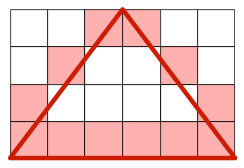
Guide
Don't be tempted to be artistic and make the pyramid "look right" by insisting on a 1-pixel point at the top. Be sure to meet the requirements exactly. Consider example 3 below and the image above, for example. Notice that the requirements imply that your rendering will be symmetrical left-to-right.
Minor hint: first draw the triangle upside down until the geometry is right, then fix the loop over height to flip it the right way up.
Major hint, if you need it.
Examples
- Input: (matches the image above)
6 6 4
Output:
  ##
 #..#
#....#
######
- Input:
7 4 4
Output:
  ###
 #...#
#.....#
#######
- Input:
1 1 1
Output:
#
- Input:
12 6 6
Output:
     ##
    #..#
   #....#
  #......#
 #........#
############
- Input:
40 10 4
Output:
               ##########
          #..................#
     #............................#
########################################
Testing & Submission
As usual.
When testing yourself, don't forget to try small values and ensure that your rendering meets the specifications.